Initial access. Client side container attack

Afternoon everyone from the Great white North.
I've moved my research posts to my own site to avoid being banned on traditional social media. Many platforms such a X have begun a crackdown on anything it deems illegal; leading me to be banned near weekly. =0) Now I speak in code to keep my social media accounts alive.=0)
Unfortunately, I still have a vocational need for American social media in 2026. So here we are. It's honestly kind of weird to be subjected to American companies' censorship to communicate as a Canadian; alas digital sovereignty hasn't ever really existed in Canada.
Today I'm working on client side attacks with containers. This will hopefully would give us
initial access on a victim machine via emailing a valid Microsoft binary with a malicious dll in the same zip folder. Attached to an email social engineering the victim to "update contacts" by running the wab.exe signed binary in the folder with a "hidden" malicious dll.
Most windows app's assume any .dll loaded in it's path is legit. Let's abuse it! =0)
With this information in mind, we can start selecting our target binary for the DLL.
Finding binaries to do this job is quite simple. You of course need a windows development lab set up. I use my windows 10 flare-vm set up.
First, we find a binary from our C drive and isolate it in a folder on our desktop. wab.exe stands for Windows Address Book. Historically, it was introduced back around Internet Explorer 3 and Outlook Express to manage contacts, and in modern Windows environments, it serves as the backing application for Windows Contacts (integrated with Windows Mail). When clicked it opens our contacts folder. From a social engineering standpoint this offers us the ability to ask members of a company to update their mail contacts.
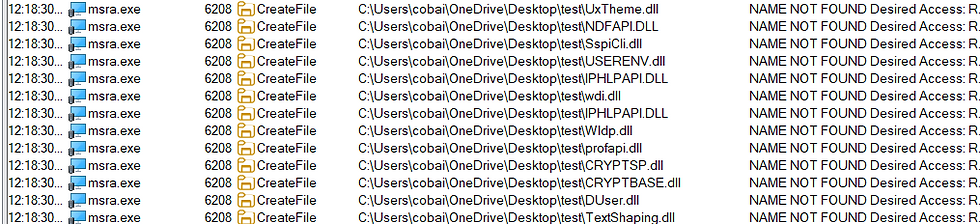
MSRA.exe is another prime candidate.

Next we must find a dll that the binary attempts to load locally in the same folder. We open Procmon and set some details to help us choose a .dll to make malicious.
We set these specific filters:
Process Name: is wab.exe then Include.
Operation: is CreateFile then Include.
Result: is NAME NOT FOUND then Include.
Path: ends with .dll then Include.
Then run the binary. We see a long list of .dll's we can use in this container attack. I choose CRYPTDLG.dll as it's the first in the list. We could copy the dll and attempt to do program it manually; however we have much better options with perfect dll proxy.
Another option being sharp dll proxy as well.
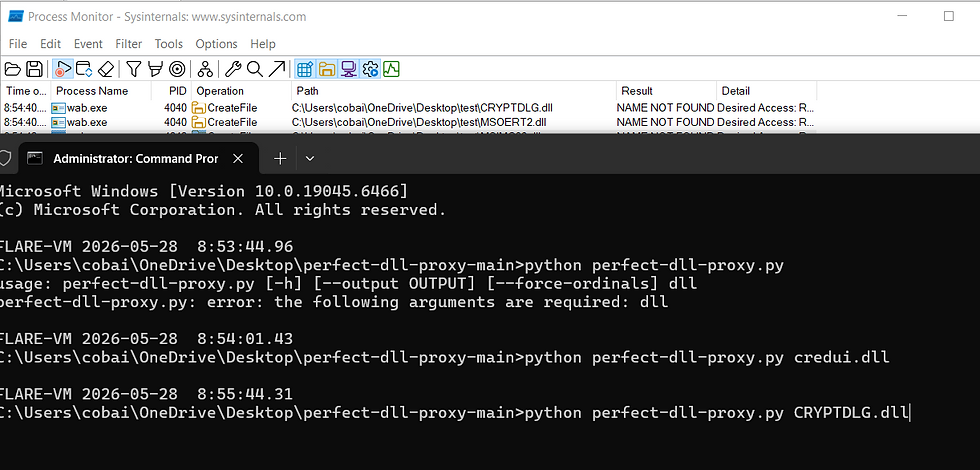
The command line tool is very straight forward. Add the dll name and viola it creates the dll file for you.

To test our project, we will add a messageboxa to process attach. This is where we will place our malicious powershell in the future.

We quickly compile our new malicious dll with cl.exe for 64 bit .dll's

Running our signed Microsoft binary we execute our malicious dll and messsagebox appears! Success!

When the archive is extracted (unzipped) onto a target machine, the +h (Hidden) attribute will be reapplied to CRYPTDLG.dll automatically.
As soon as it hits the disk, it will be hidden from normal Windows File Explorer views again unless "Show hidden files" is enabled on that system.

Our 7-zip being blocked as an attachment is due to a strict, blanket policy Google enforces. Gmail blocks any 7-zip files. They also block password-protected .zip and .rar files for the exact same reason. If their automated scanners cannot look inside the archive to verify it's safe, the gateway rejects the attachment by default to maintain a zero trust threshold.

To get around this we use google drive which does not scan for this. With some social engineering to get the download and click.
When the victim extracts the contents locally, rather than running the binary directly from the archive, the extracted files may not inherit the MotW flag.

Malicious dll executes on victim computer!
.
Comments